HFM Rebates Through a Referral Partner
An HFM rebate is a benefit an IB shares with accounts opened through its link. Eligibility, three sign-up steps, checking older accounts and what stays put.
Traders at HFM usually spend time choosing an account type and a platform, but rarely notice that an account can be linked to a referral partner and receive part of its trading fees back as a result. The HFM rebate scheme works this way: an eligible account has the rebate set up once its holder has registered correctly and completed identity verification.
The sections that follow explain what an HFM rebate is, what traders gain, the eligibility rules and three sign-up steps, and why the registration link matters. The final part answers common questions about cost, older accounts and security.
How an HFM rebate works
An HFM rebate is a benefit for HFM accounts linked to an IB (Introducing Broker), a partner that refers clients to the broker and is paid commission for doing so. Once the link is confirmed, the IB passes part of that commission back to the trader at the rate of its current programme. The arrangement is also called HFM backcom; the names differ but the substance is the same, with differences only in how each IB handles registration and what rate it offers.
Throughout, the trader still owns and manages the account, places trades and uses HFM's platforms as normal. The IB's role is limited to checking whether the account is linked correctly and setting up the rebate for eligible accounts. A genuine programme therefore never asks a trader to send money to the IB or to hand over an account password.
To be clear, BackcomHub does not currently run a rebate programme with HFM. What follows describes the general mechanism so traders can understand and check it when dealing with any IB at this broker.
What traders gain
The main benefit is an extra return while trading, with all activity still taking place on the HFM account and platform the trader already uses. The rebate is paid out of the IB's commission rather than added on top of the trader's costs.
The process is also short, usually involving three tasks:
- opening an HFM account through the IB's link;
- completing identity verification (KYC, Know Your Customer) at HFM;
- contacting the IB to have the account checked and the rebate set up.
All three are done online, and no extra software is needed. As a result, traders can complete everything from a computer or phone without meeting anyone in person.
Control over the account does not change either. The trader still logs in, manages funds, picks products and places orders, while the IB holds no money and never trades on the trader's behalf. In addition, many IBs will check an existing HFM account: the trader sends the registration email or account number, and the IB reviews the link status and explains the right next step.
Eligibility
The basic conditions are twofold: the account must be opened through the IB's link, and KYC must be completed at HFM. Registration details need to be accurate and match the documents used for verification, otherwise the application is likely to be sent back. After KYC, the trader sends the email or account number so the IB can check the link.
Accounts opened earlier are more complicated, because whether a rebate can be set up depends on the account's current status. Traders should therefore have the IB check first rather than rushing to create another account.
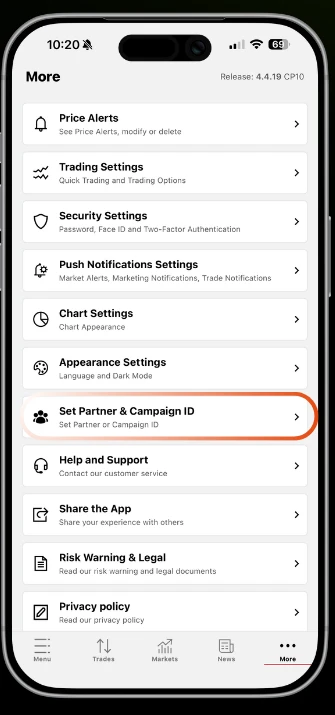
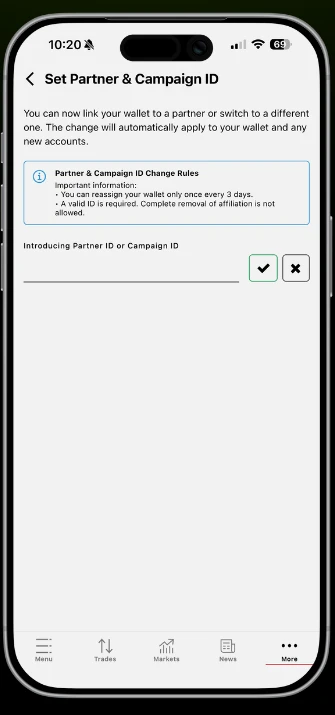
The HFM app also has a place to enter a partner code: the More tab contains Set Partner & Campaign ID. That screen comes with HFM's rules on changing partners, which traders should read carefully before entering any code.
Three steps to join
Step 1: Open an account through the IB's link
The trader opens HFM's sign-up page using the link supplied by the IB and fills in personal details as the broker asks. The email should be one in daily use, since verification messages and account notices are sent there. Using the correct link is what allows HFM to record the account under that IB.
Step 2: Complete KYC
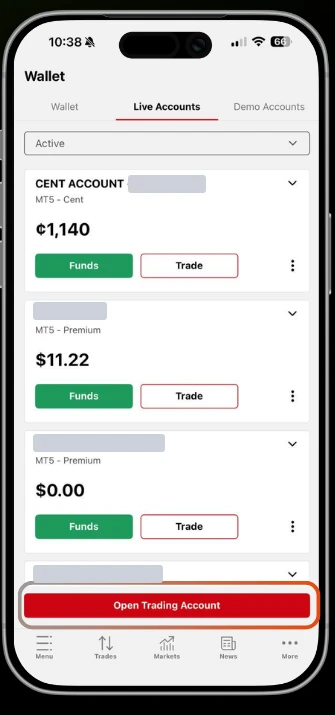
After creating the account, the trader logs in to HFM's client area and goes through identity verification. HFM lists each step, the trader uploads the requested documents and then waits for approval. Only after KYC is accepted is the account eligible for the IB to set up the rebate.
Step 3: Contact the IB to set up the rebate
With a verified account, the trader contacts the IB through the channel it publishes and asks for the account to be checked and the rebate activated. Keeping the confirming message or email is worthwhile, because it is the reference point when rebates need to be reconciled later.
Does the account change
Once the rebate is set up, the account works exactly as before: the trader uses the same HFM login and manages all trading. Specifically, the trader can still:
- log in to the HFM platform;
- open and close trades;
- track balance and trading history;
- deposit and withdraw through HFM's system;
- choose account types and products as needed.
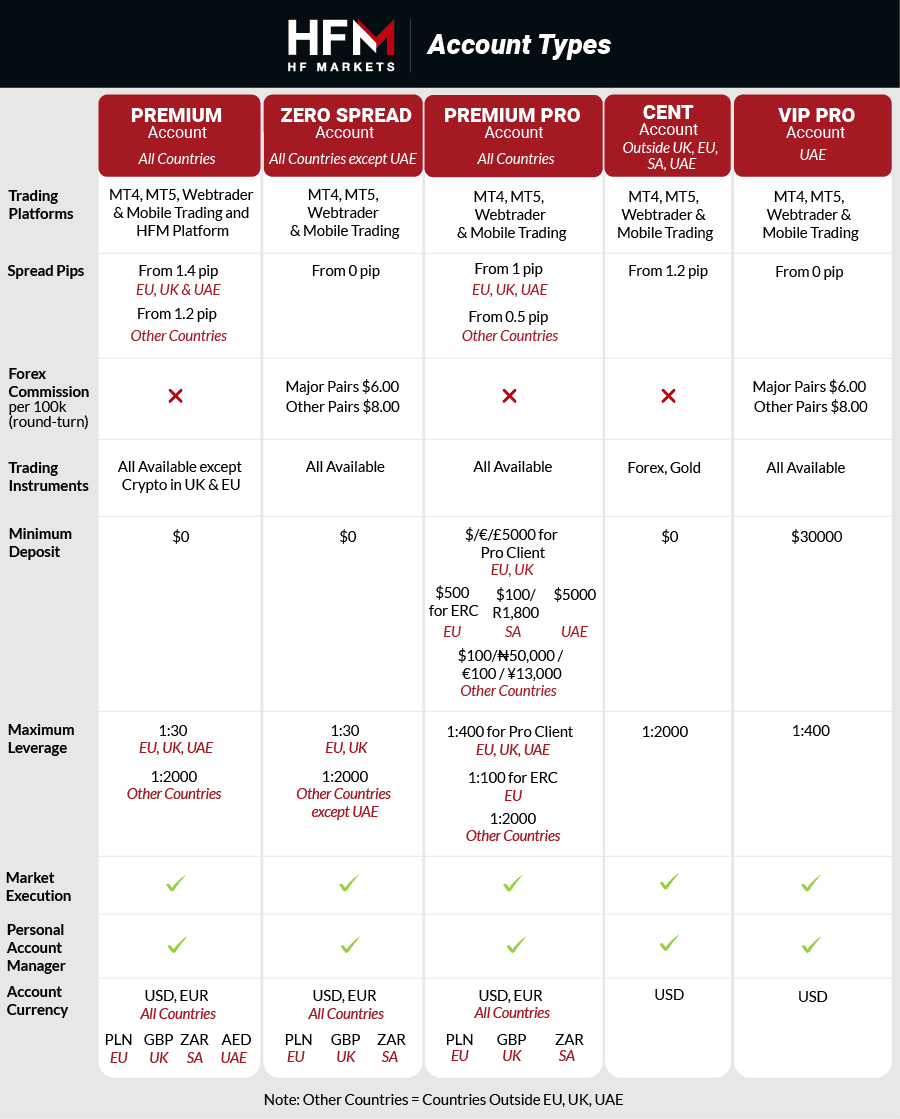
In other words, setting up a rebate only changes the link status between the account and the IB's programme. Account type, platform and trading conditions are still the trader's choice from the range HFM offers.
Why the right link matters
The registration link is what tells HFM which IB an account belongs to. If a trader signs up directly on HFM's website or through another party's link, the account may already sit under a different link, and the IB then has to check before saying whether a rebate can be added. Using the right link from the start therefore shortens confirmation considerably.
Frequently asked questions
Does signing up for a rebate cost anything?
Normally not, because the rebate comes from the commission the broker pays the IB. The trader only needs to contact the IB to have an eligible account checked and set up.
Can an existing HFM account join?
It depends, since the outcome rests on the account's current link status. The trader sends the email or account number to the IB for a check before doing anything else.
Does the password need to be shared?
No. The check only needs the email or account number, so traders should never give a password or OTP code to anyone, and should stop if any party asks for them.
Can the account be used normally afterwards?
Yes, the trader still manages and trades on their own HFM account. The only difference is that trades closed after setup count towards the IB's rebate programme.
Where to register?
Traders contact the IB running the HFM rebate programme directly through the channel that IB publishes. Before opening an account, it is also worth reviewing HFM's licences, costs and platforms on the broker's official website.
Key points
An HFM rebate has a short process: open an account with the IB's correct link, finish KYC, then contact the IB for the check and setup. After that, the account remains under the trader's control on HFM's system, while for older accounts the IB needs to review the link status before advising the next step.
For the forex brokers where BackcomHub does pay rebates, such as Exness and Vantage, rates are listed on the Exness rebate and Vantage rebate pages, and moving an existing account to another IB is covered in switching IB. BackcomHub is an IB of the brokers listed on the site and receives IB commission from them; questions can be sent via the Telegram or email shown on the homepage.
Sources
- HFM, official website: https://www.hfm.com/
- DCtoptrade (screenshots): https://dctoptrade.vn/