HFM Backcom and Signing Up via an IB
HFM backcom is a rebate on trading by an HFM account linked to an IB. How it works, who it suits, three sign-up steps, existing accounts and HFM account types.
Traders at HFM (formerly HotForex) pay a cost on every trade, and like many other forex brokers, HFM shares part of that revenue with the partners who referred its clients. When an account is opened and linked through such a partner, the trader can receive part of that cost back under the name backcom. The questions people usually have are how to sign up, whether the account changes in any way, and what to do if they already hold an HFM account.
The sections that follow explain what HFM backcom is, who it suits, the three basic sign-up steps, how to check an existing account and the HFM account types traders most often meet. The common thread is that traders still trade and manage their accounts directly on HFM, while the partner only handles the link and pays the rebate.
What HFM backcom is
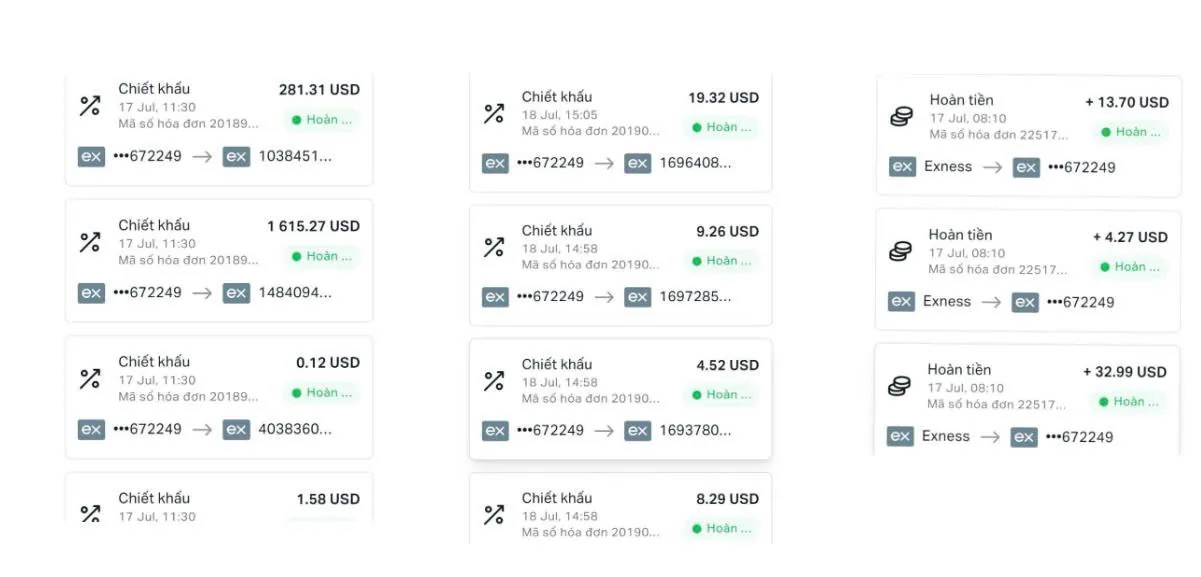
HFM backcom is money paid back based on the trading activity of an HFM account linked to the programme of an introducing broker (IB). Specifically, HFM pays the IB commission on the trades of clients that IB referred, and the IB passes part of it back to the traders themselves. Some call this an HFM rebate, but in substance it is the same mechanism of returning money generated by trading.
Joining does not change who owns the account. The trader still logs in and trades on the HFM platform, while the IB only helps with linking the account and activating backcom once the trader has completed the required registration steps. Programmes of this kind are usually open both to people about to open a new account and to existing HFM clients who want to check whether their account can be linked.
Rebates are not exclusive to forex either. Investopedia describes a rebate as a common way of lowering trading costs through an intermediary, and the concept is explained in more depth in what is backcom.
BackcomHub does not currently run a rebate programme with HFM, so the steps here describe signing up through an IB in general, with no HFM code or rebate rate attached. BackcomHub is an IB of the brokers listed on the site and earns IB commission from them; rebate rates for those brokers are on pages such as Exness rebate and Vantage rebate.
What stays the same after linking backcom
The convenience of HFM backcom is that the paperwork is short and traders do not have to change how they use their account. Once backcom is activated, the trader still:
- logs in with their own HFM account;
- trades on the platform they already use;
- manages the account and every trade themselves;
- chooses whichever HFM account type suits them.
The only conditions are that the account must be opened through the IB's correct link and must have completed identity verification (KYC, know-your-customer) before the trader asks for activation. Without either of those, the IB usually cannot register the account in the programme.
Benefits of joining
The first benefit is an extra sum returning from the trader's own activity. When the account trades within the programme's conditions, the trader receives the matching rebate. For frequent traders, those amounts add up to a meaningful sum, and they come attached to the HFM account already in use.
The second benefit is that no move to another platform is needed. Traders keep trading directly on HFM's system, and linking backcom does not require installing any separate app or trading software from the IB.
The third benefit is that control of the account stays with the trader. Login details are not shared with anyone, because the IB only checks the link and activates backcom for eligible accounts. In other words, the IB's role ends at being recorded as the referring party.
Who HFM backcom suits
HFM backcom can suit several groups of traders, each with its own points to watch. The first group is people preparing to open an HFM account. For them, signing up through the correct link from the start ensures the account is recorded in the IB's linking system. After KYC is complete, the trader only needs to send the details to the IB to activate backcom.
The second group is traders already active on HFM. In this case, the trader sends the registration email or account number to the IB so it can check the current link status. The IB then replies whether the account can be activated directly or whether an additional new account is needed.
The third group is consistent traders, since the rebate grows with trading activity and the benefit is clearest for those who trade regularly on HFM. The last group is beginners, who can also sign up from scratch by following the proper process. Whatever the group, the choice of HFM account type should rest on each trader's needs and style rather than on the rebate.
Three steps to sign up for HFM backcom
The sign-up process has three main steps. Traders should follow them in order, because skipping or reversing a step can stop the account from being recorded in the programme from the outset.
Step 1: Open an HFM account via the IB's link
The trader opens the HFM sign-up link supplied by the IB and fills in the details as the broker instructs. The registration email should be one in regular use, since that is the channel for verification codes and account notices. When opened through the correct link, the account is recorded in the connection system between HFM and that IB.
Step 2: Complete KYC on HFM
After creating the account, the trader logs in to the client area and goes through identity verification. HFM shows the steps and the documents still needed. The personal details on the account must match the verification documents, otherwise the application is easily sent back. Only when the KYC status shows as complete can the account move on to the backcom check and activation.
Step 3: Contact the IB to activate
In the final step, the trader contacts the IB through the channel it publishes and sends the registration email or account number so the IB can check and activate backcom. From activation onwards, eligible trades on the account start earning rebates under the programme's conditions.
The account after linking backcom
After activation, the account runs entirely on HFM's system. The trader keeps logging in and trading on the chosen platform, and tracks trades and handles all account management directly on HFM.
Backcom is attached solely on the basis of the link between the account and the IB's programme. The IB therefore has no say in trading decisions or account control, and every trade remains the trader's own call.
With an existing HFM account
For an account opened earlier, the outcome depends on its current link status, so the first step is always to send the email or account number to the IB for a check. If the account is not yet tied to any partner, the IB may be able to guide a direct activation; if it is already tied to another partner, the trader is usually advised to open an additional new account.
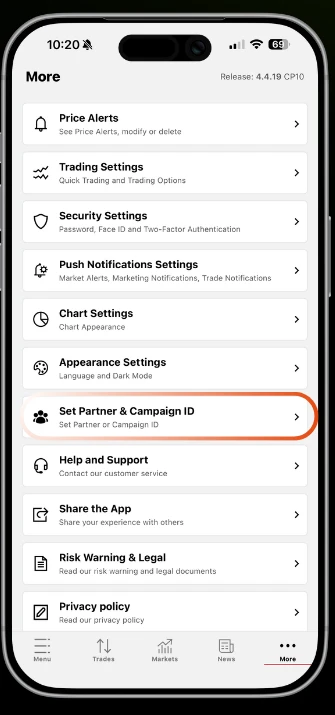
In the HFM app, the More tab has a Set Partner & Campaign ID item where clients enter a partner code. That screen comes with a box setting out HFM's rules on changing partner, so traders should read it carefully, or ask the IB, before making any change.
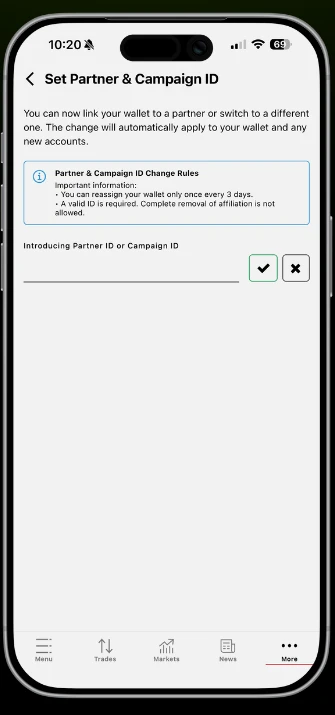
Each broker has its own rules on changing partner, so a method that works elsewhere may not apply to HFM. The general principles for moving an existing account to another IB are gathered in how to switch IB.
HFM account types
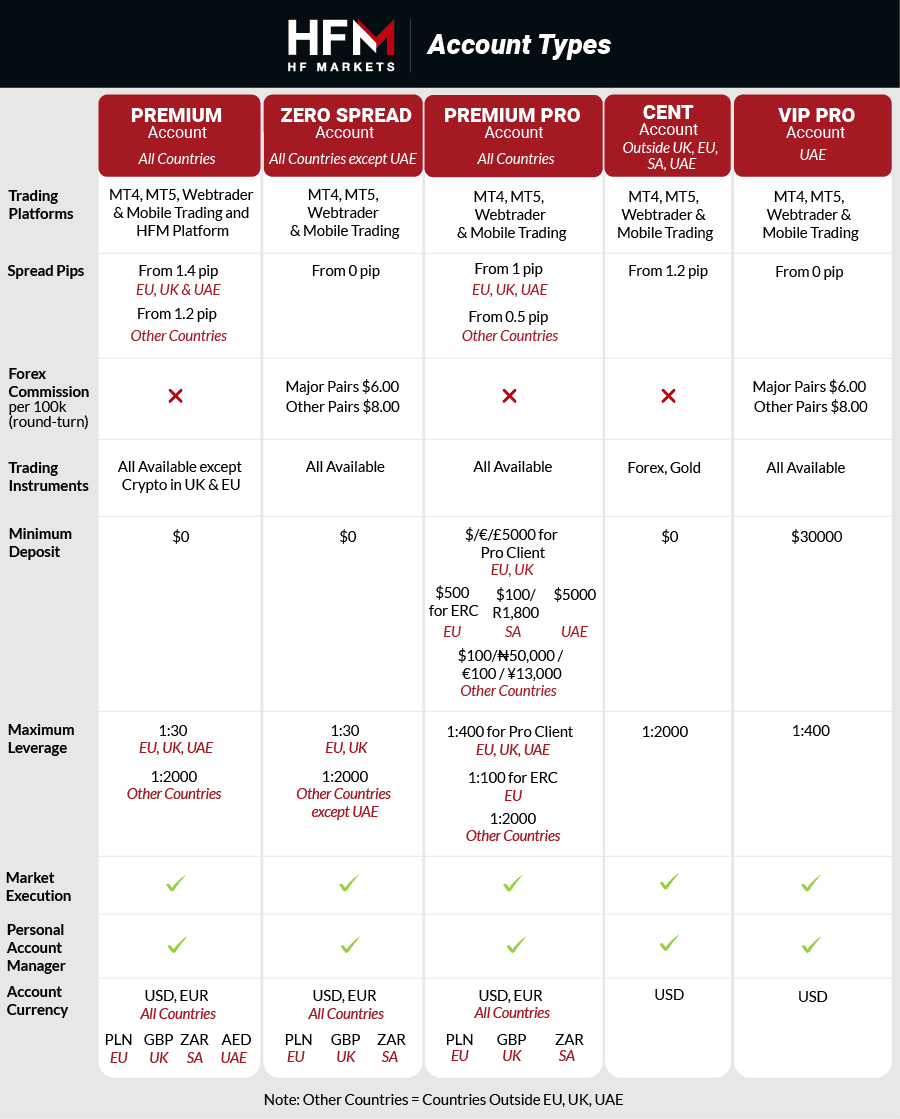
HFM offers several account types, of which Cent, Zero, Pro and Premium are mentioned most often. Whether backcom can be linked is checked account by account, so traders unsure which type to pick can explain their trading needs to the IB before signing up. The basic features of each type are as follows:
- Cent: trades at a smaller scale than a standard account, suited to those testing with little capital.
- Zero: low spreads plus a commission charged on each lot.
- Pro: also aimed at low spreads, but with a fee structure different from Zero.
- Premium: HFM's mainstream account type.
Choosing an account type and signing up for backcom are two separate tasks. Traders choose the account to fit their needs first, and only then link it to activate backcom. Because account conditions can change, traders should double-check them on HFM's official website before opening one. How to compare costs between an account that bundles fees into the spread and one that charges a separate commission is covered in Standard vs Raw Spread accounts.
Frequently asked questions
How does HFM backcom sign-up work?
The trader opens an HFM account through the IB's link, completes KYC, then contacts the IB for the check and backcom activation. The first two steps happen directly on HFM, while the last is an exchange with the IB.
Can an existing HFM client join?
Possibly. The trader sends the email or account number to the IB to check the current link status, after which the IB explains the next step.
Does the account password need to be shared?
No. Only the registration email or account number is needed, and the password and OTP codes are never part of the information to provide. Anyone asking for them should be refused.
Does linking backcom mean changing trading accounts?
A new account opened through the IB's link can be activated as soon as KYC is complete. For an existing account, the outcome depends on its link status after the check.
Key points
HFM backcom is for accounts opened and linked through an IB. The process has three steps: create the account through the correct link, complete KYC and contact the IB for activation. After that, traders still manage and trade their HFM accounts directly, while those with an earlier account only need to send their details for the IB to check the link status before taking the next step.
Risk notice
Rebates do not change or reduce the inherent risk of trading forex and CFDs. They are only a partial refund of fees, not an investment that generates returns, and they guarantee no profit. Trading forex and CFDs can lead to losses, including the loss of all capital, so everyone should assess the decision carefully before taking part. The content above is for reference only and is not investment advice.
Sources
- Investopedia, "Rebate": https://www.investopedia.com/terms/r/rebate.asp
- HFM, official website: https://www.hfm.com/
- DCtoptrade (screenshots): https://dctoptrade.vn/