IC Markets Help for Vietnamese Traders
Where Vietnamese traders often need help at IC Markets: sign-up, platform choice, login, verification, funding and rebates of 4 USD/lot Standard, 2 USD/lot Raw.
Vietnamese traders who are new to IC Markets tend to get stuck at very specific points. Some do not know where to open an account, some are unsure which link to log in through, and others download the wrong one of MT4, MT5 or cTrader. At the withdrawal stage the broker may ask for a bank statement, and many traders have yet to work out how rebates (also called backcom) are calculated. Because these problems come up again and again, demand for Vietnamese-language help with IC Markets keeps growing.
The sections that follow walk through each common situation, what BackcomHub can guide traders through, the current backcom rates and the safety rules for getting help from anyone else. Traders who need a quick answer can contact BackcomHub via the Telegram or email listed on the home page.
What traders usually need help with
Help with IC Markets goes beyond a few general questions about the broker. In practice, traders need guidance at many stages, from opening an account to trading, funding, withdrawing and dealing with errors. Common needs include:
- opening an IC Markets account;
- choosing between a Raw Spread and a Standard account;
- choosing the MT4, MT5 or cTrader platform;
- finding the latest access link;
- downloading and logging in to MT4, MT5 or cTrader;
- verifying the account;
- depositing and withdrawing;
- uploading a bank statement when the broker asks for one;
- receiving rebates, or backcom, at IC Markets;
- fixing login errors, wrong servers, forgotten passwords or platform problems.
For newcomers, guidance in Vietnamese makes each step faster. More importantly, it helps them avoid the wrong link, the wrong platform or the wrong fix when an error appears.
Situations where guidance helps
Not everyone who uses IC Markets needs help. Even so, in the five situations below, someone to point the way saves time and prevents mistakes that are hard to undo later.
Not sure where to open an account or what to pick
Newcomers often weigh three things at once: which link to sign up through, whether to pick Raw Spread or Standard, and whether to use MT4, MT5 or cTrader. Of the three, the platform choice causes the most trouble. The reason is that an MT4 account cannot log in to MT5, an MT5 account cannot be used on MT4, and cTrader has its own login method. Traders should therefore decide on the platform that fits their needs at the moment they open the account.
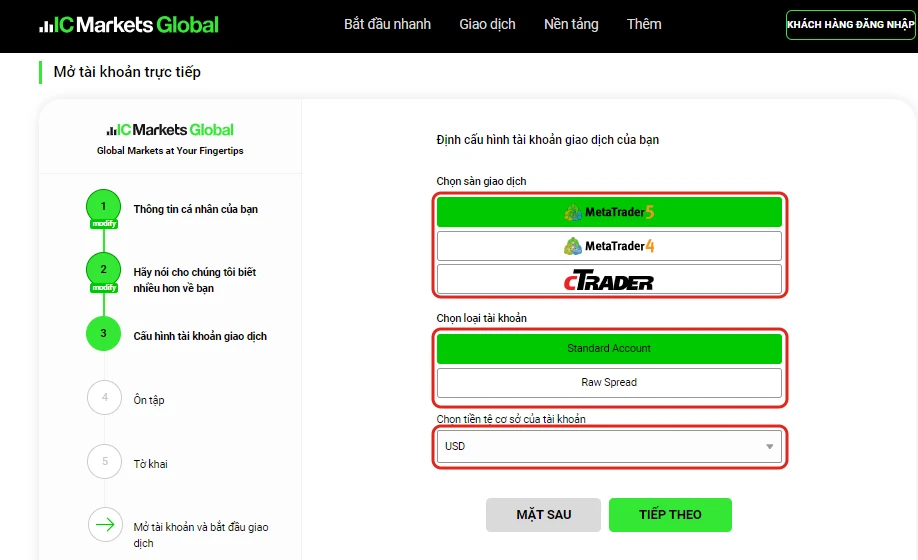
Traders who want the account in BackcomHub's rebate programme should open it through the IC Markets sign-up button on the BackcomHub home page. That link carries IB number 91994, so the account is linked to the right referrer from the start.
Unable to log in
A very common problem is failing to get into the IC Markets Client Area. The cause is usually a mistyped email, a wrong password, an old link, a forgotten password or a browser glitch.
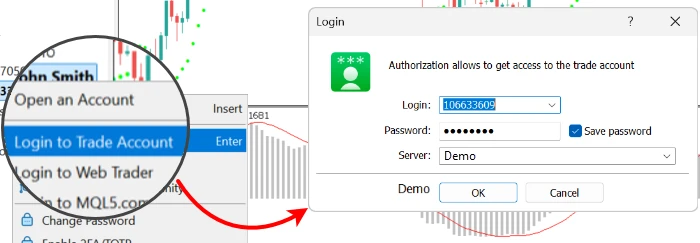
In addition, some traders can reach the Client Area but cannot log in to MT4, MT5 or cTrader. This usually comes from choosing the wrong server, entering the wrong trading password or opening the wrong platform. With a screenshot of the error, BackcomHub can go through each step with the trader to find whether the problem lies in the link, the account, the password, the server or the platform.
Unsure which platform to download
IC Markets supports several trading programs, the most popular being MT4, MT5 and cTrader. Precisely because there are several options, newcomers easily install a version that does not match their account. Another frequent mistake is finishing the installation without knowing which details to log in with, even though IC Markets normally emails the login details after the account is opened.
Problems with deposits or withdrawals
Traders can hit several different situations when moving money. For example, they may not know which method to pick, a transaction may be slow to process, the first withdrawal may trigger a request for a bank statement, or they may not know where to check a withdrawal's status.
At this stage, BackcomHub can explain the basic process, help prepare the required documents and point out the usual mistakes. However, every security step, such as logging in, confirming a transaction, entering an OTP code or submitting a withdrawal request, must be done by the trader personally.
Wanting to check backcom
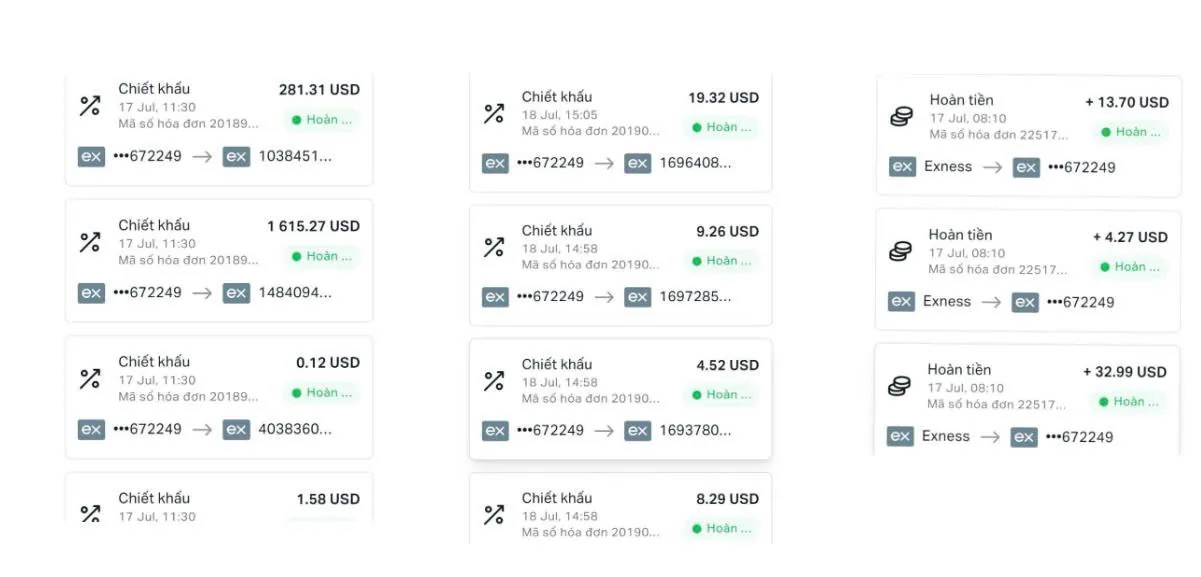
Many traders open IC Markets accounts through an IB to receive an extra rebate. Backcom is money paid back according to valid trading volume, measured in lots. When unsure whether an account has been tracked, how the rebate is calculated or what the conditions are, traders can ask BackcomHub via Telegram or email. The exact rates are in the next section, and the general idea is explained in what is backcom.
What BackcomHub can guide
With those situations in mind, the next question is how far BackcomHub can help. The focus is on practical steps: opening the account correctly, using the right link, choosing the right platform and quickly clearing familiar errors.
Opening an account
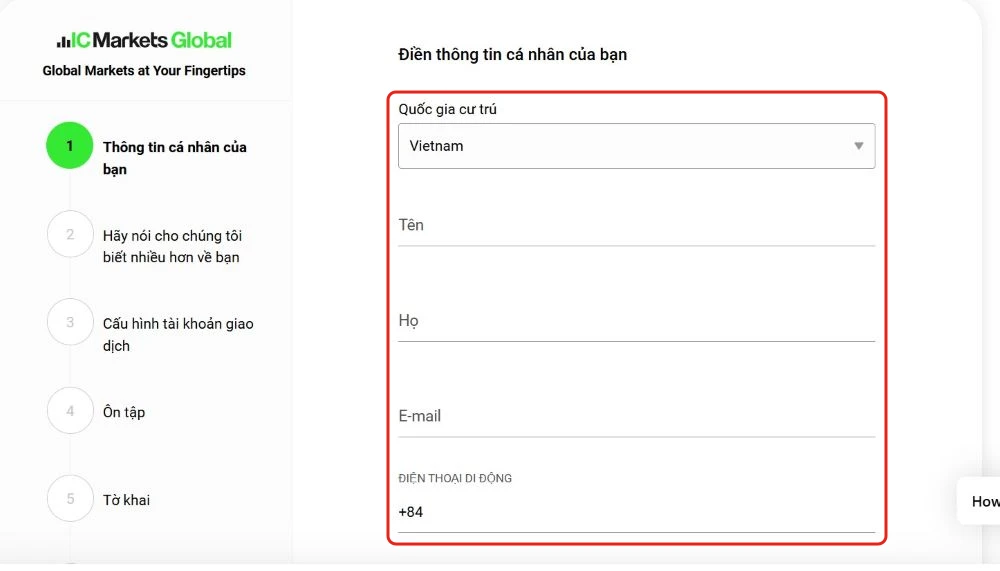
For traders without an account, BackcomHub can guide them from the beginning. The process usually involves five steps:
- open the IC Markets sign-up link on BackcomHub;
- enter personal details;
- choose the account type;
- choose the trading platform;
- complete the application.
Traders still torn between Raw Spread and Standard, or between MetaTrader and cTrader, can ask for a suggestion based on their trading style. A cost comparison of the two account types is in Standard vs Raw Spread accounts.
Verifying the account
Once the account is open, IC Markets may ask for proof of identity and address. This step matters because it keeps the account running smoothly, especially for deposits and withdrawals.
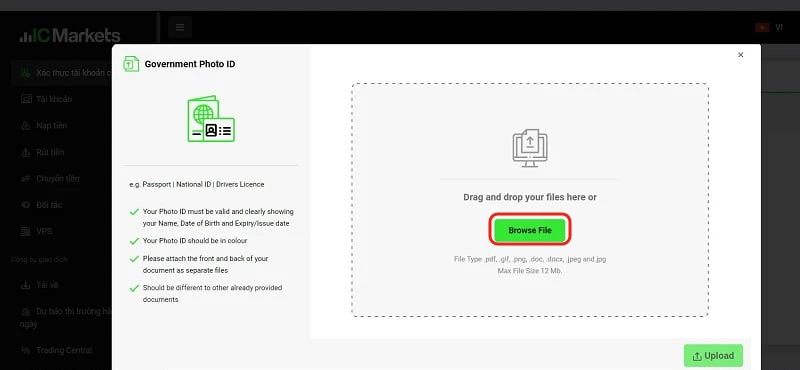
Commonly used documents include an identity document, proof of address, a bank statement or a bill with matching details. The exact requirements can vary from case to case. BackcomHub can help prepare and upload the documents, and explain how to fix typical problems such as blurry photos, mismatched details or missing papers.
The latest access link
The IC Markets link for Vietnamese traders has been changed to a new one. Anyone who saved the old link should therefore update it, and the IC Markets button on BackcomHub always points to the current link. Using the right link avoids landing on the wrong page, reduces the risk of unknown links and makes rebate checks easier.
IC Markets backcom
When an account is opened through BackcomHub and tracked correctly, the trader receives backcom at one flat rate for every symbol, split by account type. Data as of 18 October 2026, paid daily:
| Account type | Rebate (USD/lot) |
|---|---|
| Standard | 4 |
| Raw Spread | 2 |
A higher rebate does not necessarily mean a cheaper account, so traders need to compare the net cost of each account type. BackcomHub is an IB of the brokers listed on the site, including IC Markets, and receives IB commission from them; the rebate paid to traders comes out of that commission.
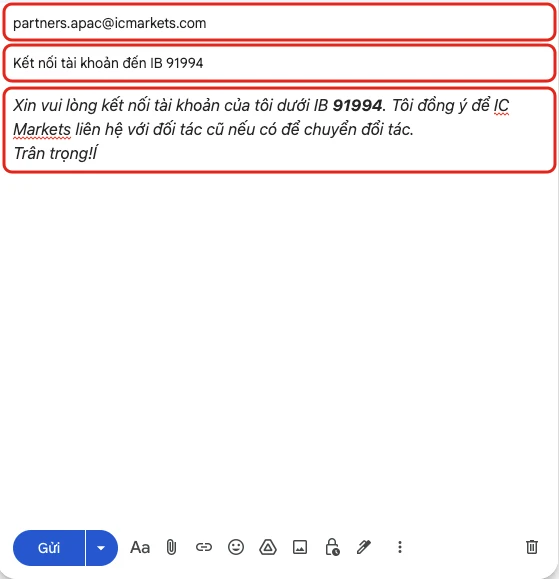
An account opened directly with IC Markets can still ask to be linked to IB 91994 by writing to the broker's partner team. The detailed steps are in the guide on switching IB.
Even so, backcom only reduces part of the cost and is no reason to overtrade. Traders still need to manage their capital, control risk and only enter trades with a clear plan.
Safety rules when getting help
Whoever provides the help, the trader remains responsible for protecting the account. Login details and personal data should therefore be handled carefully, following four rules.
Never hand over passwords
Traders should not send anyone their Client Area password, MT4, MT5 or cTrader password, email password or OTP code. When help is needed, a screenshot of the error and a question about how to fix it are enough. Logging in, security checks, deposits and withdrawals remain the account holder's own job.
Never send money to strangers
Deposits and withdrawals should only go through the IC Markets Client Area or the methods the broker supports. Sending money to an individual who claims to be a helper, without fully understanding why, is something to avoid. At the first sign of anything suspicious, traders should stop and ask before going further.
Check the link before logging in
Before typing an email and password, traders should look closely at the address in the browser bar. Unknown links sent from unclear sources should not be used to log in. To avoid mistakes, traders can save the official IC Markets address or go in through the button on BackcomHub.
Sensitive issues belong with official support
BackcomHub can explain processes and clear up familiar errors. For sensitive matters such as a locked account, a trade dispute, a security incident or a formal complaint, however, traders should contact IC Markets support directly, in addition to asking BackcomHub.
Frequently asked questions
Does BackcomHub charge for IC Markets guidance?
No. Moreover, traders who open their account through BackcomHub also receive backcom under the applicable conditions.
Does BackcomHub help with opening an IC Markets account?
Yes. BackcomHub guides Vietnamese traders through opening an account, choosing the account type and platform, and fixing some common sign-up errors.
Who to contact when IC Markets login fails?
First, traders should recheck the email, password, link and browser. If that does not work, they can contact BackcomHub via Telegram or email for help checking each step. Security issues or account disputes, however, also need to go to IC Markets' official support.
Is backcom available at IC Markets?
Yes, provided the account was opened through BackcomHub's link, or has been moved to IB 91994, and meets the rebate conditions. Traders should contact BackcomHub to check their specific case.
Key points
The need for IC Markets help usually comes from very practical tasks: opening an account, logging in, installing a platform, fixing funding errors, uploading statements or checking backcom. Most of these go faster with someone explaining each step. Even so, passwords, OTP codes and withdrawal requests must always stay in the trader's own hands. When guidance is needed, traders can contact BackcomHub via the Telegram or email listed on the home page.
Sources
- IC Markets, official website: https://www.icmarkets.com/
- BackcomHub rebate table, IC Markets data as of 18/10/2026, from dctoptrade.vn
- DCtoptrade (screenshots): https://dctoptrade.vn/