Requotes on Exness and How to Reduce Them
A requote appears when price moves during an instant execution order. Why it happens, a EUR/USD example, ways to reduce it and the Exness account without it.
Clicking Buy and seeing a box pop up with a new price is something many Exness traders have run into. That box is called a requote: the broker is saying that the price the trader just asked for is no longer available, and it offers a different price so the trader can decide whether to go ahead.
The sections that follow explain how a requote works, why it happens, a concrete EUR/USD example, ways to see fewer of them, and which Exness account type does not have them at all.
What a requote is
A requote is a notice shown in the trading platform telling the trader that the price has changed since the order button was pressed. The notice only stays on screen for about 3 seconds. During that window, if the trader rejects it or does nothing, the order just sent is cancelled and no position is opened.
Why requotes happen
The cause lies in instant execution. Under this mode, the broker only fills an order at exactly the price the trader requested; if it cannot, the order is not filled. As a result, when the instrument's price moves while the order is being processed, the broker does not fill at the new price automatically but asks the trader again through a requote. Two outcomes follow:
- The trader accepts the new price: the order is filled at exactly the quoted price. If the price changes once more, another requote appears.
- The trader rejects it or does not respond: the notice disappears and the order is cancelled. Some documentation gives the waiting time in this case as 2 seconds rather than 3, so traders should treat it as a few brief seconds and decide quickly.
A EUR/USD example
A trader wants to buy EUR/USD on a Pro account, an account type that uses instant execution. When the trader clicks Buy, the quote shows 1.21701/1.21727, meaning a bid (sell price) of 1.21701 and an ask (buy price) of 1.21727. However, in the instant it takes to click, the quote has moved to 1.21715/1.21738.
Because the ask is no longer 1.21727, a requote appears asking the trader to confirm the new level. If the trader accepts within 3 seconds, the buy order is filled at 1.21738, the new ask. If the trader rejects it or lets the notice lapse, the order is cancelled.
How to reduce requotes
Requotes cannot be removed entirely on an instant execution account, but traders can see fewer of them in seven ways:
- Check the internet connection; an unstable line makes orders reach the server later, so a poor connection is worth raising with the provider.
- Use a VPS (virtual private server), a rented computer that runs around the clock on a steadier connection than a home machine.
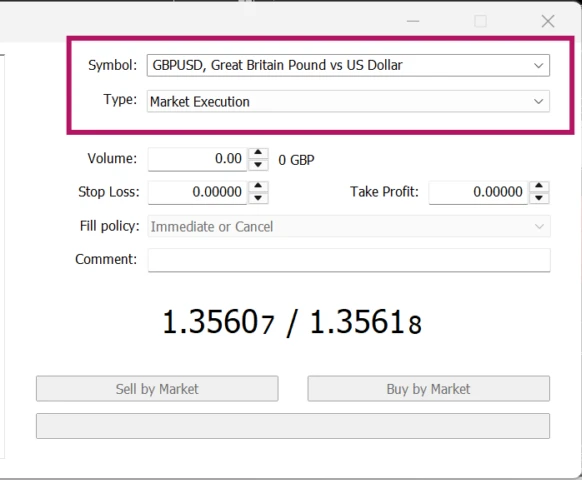
- Set a maximum deviation in the order window, which lets the order fill as long as the price has moved by no more than the chosen number of points.
- Review the EA settings (the automated trading robot) to make sure its parameters are set correctly.
- Avoid highly volatile periods, such as session close or the release of major economic news.
- Hide unused symbols in the Market Watch window.
- Switch to market execution, which fills at the best available price instead of insisting on the exact requested one.
Of those seven, staying out around news releases is usually the most effective for beginners, because that is also when prices jump the most. The reasons are covered in the riskiest moment to trade forex.
Which Exness account to choose
Beyond the technical tips, the most thorough fix is choosing the right account type. Exness has four main account types: Standard, Pro, Zero and Raw Spread. Of these, Standard has no requotes, and orders are filled immediately. In exchange, Standard spreads are slightly higher than those on Pro, Zero or Raw Spread.
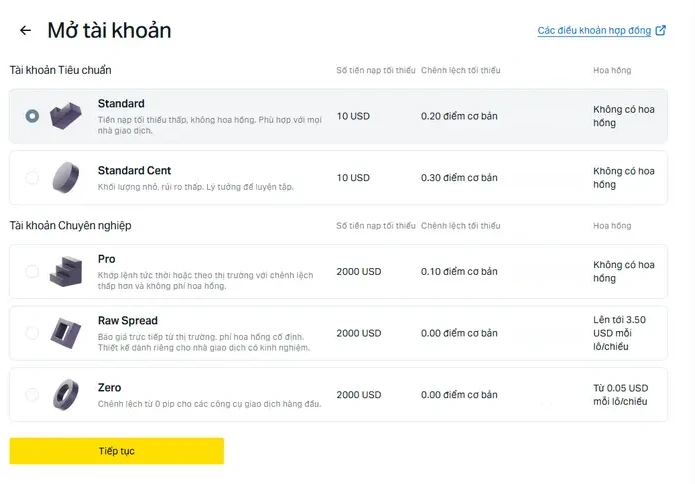
Traders therefore have to weigh two options: a lower spread with the chance of requotes, or a slightly higher spread with orders that always fill. How to compare total costs between account types is explained in Standard vs Raw Spread accounts, and the features of the Zero account are covered in the Exness Zero account review.
Rebates also differ by account type. In the BackcomHub rebate table, with Exness data dated 20/11/2026, one lot of EUR/USD earns 3.2 USD on Standard & Cent, 1.49 USD on Pro and 0.87 USD on Raw & Zero. BackcomHub is an IB of Exness and earns IB commission from the broker; full symbol-by-symbol rates are on the Exness rebate page.
Sources
- Exness, official website: https://www.exness.com/
- BackcomHub rebate table, Exness data dated 20/11/2026, from dctoptrade.vn
- DCtoptrade (screenshots): https://dctoptrade.vn/