Opening an IC Markets Account
The steps to open an IC Markets account: age and document rules, personal details, MT4, MT5 or cTrader, Standard or Raw Spread, a security question and KYC.
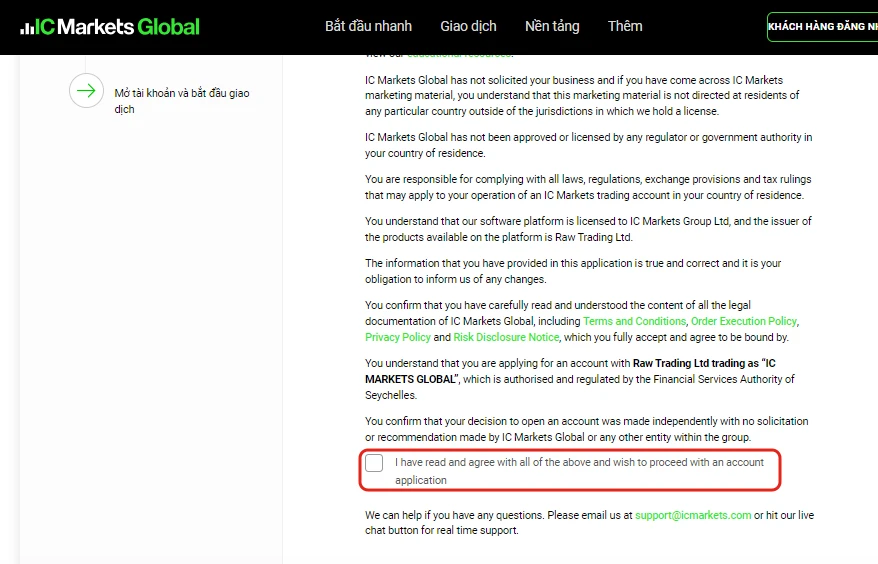
IC Markets remains one of the brokers Vietnamese traders choose most often, mainly for its low costs, fast execution and transparent way of operating. Recently the broker has streamlined account opening, so registering and submitting verification documents takes only a few actions. Even so, the IC Markets form runs across several pages, and a single detail that does not match the trader's documents can get the application returned.
The sections that follow set out the minimum requirements before registering, then walk through seven steps from the homepage to the moment the KYC file is approved. The last part answers three common questions about fees, documents and approval time.
Requirements for opening an account
Before registering, traders need to meet a few requirements set by the broker and its regulators. Meeting them is what lets identity verification, known as KYC (know your customer), go smoothly and keeps rejections to a minimum.
Aged 18 or over
IC Markets only accepts individual clients who are legally adults. Anyone under 18 is blocked by the system at the very first registration step.
A personal email in regular use
Email is the broker's main channel for contacting the trader throughout account opening. Specifically, the address is used to:
- receive the verification code at registration;
- receive notice that the account has been activated;
- receive the MT4, MT5 or cTrader login details.
For that reason, traders should use an inbox they check every day, so important messages such as login details are not missed.
A phone number in the trader's own name
The broker asks for phone verification to add a layer of security to the account. In addition, IC Markets support staff call this number when the application needs extra information.
Proof of identity
Proof of identity (POI) can be a national ID card, a citizen ID card, a passport or a driving licence. The document must be valid and the photo must be clear, and the details on it must match what the trader enters in the sign-up form.
Step 1: Go to the official sign-up page
The trader opens the official IC Markets website and clicks "Open an Account" on the homepage to begin. Traders who want rebates through BackcomHub should reach the broker through the IC Markets sign-up button on the BackcomHub homepage, because that link already carries partner code 91994, which is also BackcomHub's IB number at IC Markets. Background on the broker and its service quality is covered in the IC Markets review.
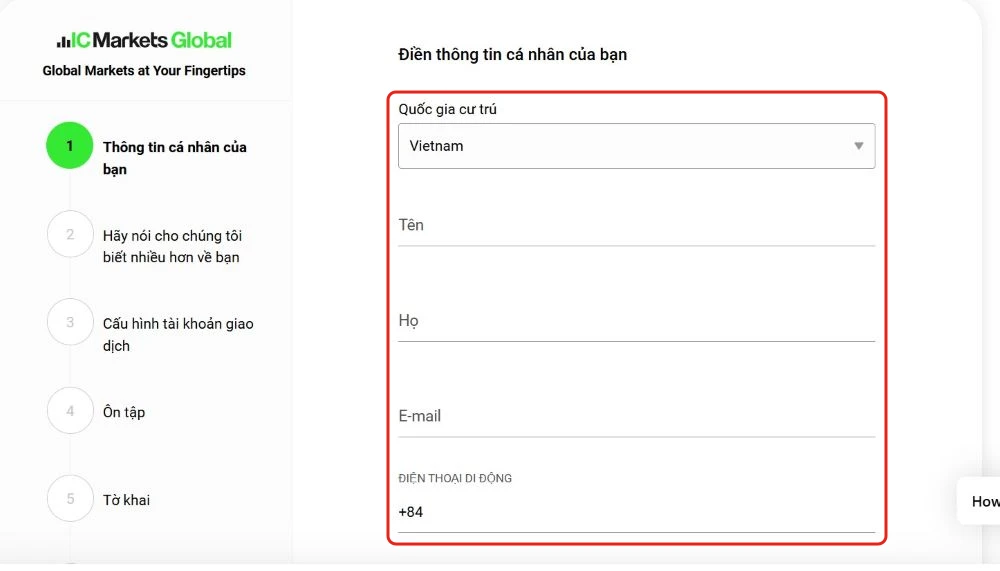
Step 2: Enter basic personal details
The first page of the form asks for the main identifying details. The fields to fill in are:
- Country of residence: where the trader currently lives.
- Full name: typed without Vietnamese diacritics and matching the ID card or passport, so verification does not get stuck.
- Email: a personal inbox that has never been used to register with IC Markets.
- Phone number: written in international format, replacing the leading zero with +84 or the relevant country code.
When finished, the trader clicks "Continue" to move on. A name typed in a different order from the document should be corrected right here.
Step 3: Add registration details
The next page asks for a little more information to identify the account holder. First comes the account type: people opening for themselves choose Individual, while the other options are for companies or organisations. Next is the residential address, which must be written exactly as on the documents to avoid rejection at the KYC step. With both done, the trader clicks "Continue".
Step 4: Set up the trading account
At this step the trader picks three settings that decide how the account works, namely the platform, the account type and the currency. Each choice suits a different kind of trader.
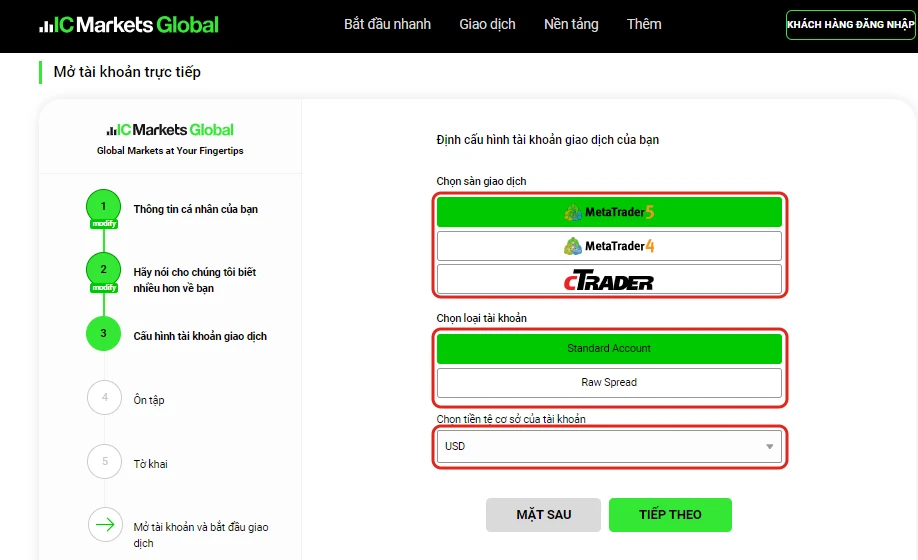
For the platform, IC Markets offers three options:
- MT4: easy to use and familiar to most new traders;
- MT5: suited to those who want extra tools and features;
- cTrader: a professional interface with fast execution.
For the account type, there are two options with different ways of charging:
- Standard: spread (the gap between buy and sell prices) from 1.0 pip with no separate commission, suited to beginners;
- Raw Spread: spread from 0.0 pip but a commission of 3.5 USD per lot, aimed at experienced traders.
The account currency is best set to USD, although traders can choose AUD or EUR if needed. Anyone torn between the two account types can see how to compare costs in Standard vs Raw Spread accounts, and install the platform with the IC Markets MT5 download or cTrader download guides.
Step 5: Review the details
Before submission, IC Markets displays all of the data just entered, such as name, email and address. Traders should read each line carefully, because one wrong detail can affect verification, trading and even withdrawals later on. To edit an item, the trader clicks the pencil icon next to it. Once everything is correct, the trader clicks "Continue".
Step 6: Choose a security question
The broker asks the trader to pick a security question from a list and enter an answer. That answer is used when the account needs to be recovered.
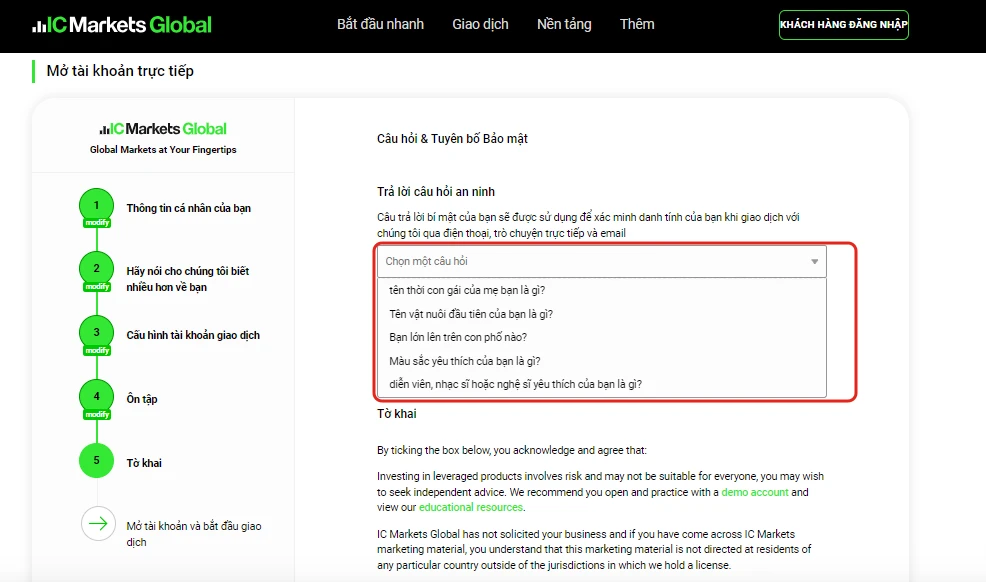
To avoid trouble later, traders should follow three rules:
- keep the answer short and easy to remember;
- leave out special characters;
- note it down somewhere safe in case it is forgotten when recovery is needed.
After the form is submitted, the broker confirms the application has been received and sends the login details by email.
Step 7: Verify identity
KYC is the final step before the account can be used in full. Traders need two groups of documents:
- Identity document: both sides of a citizen ID or national ID card, a passport or a valid driving licence.
- Proof of address: a bank statement, an electricity, water or internet bill, or a similar document dated within the last 3 months.
Next, the trader logs in to the Client Area with the email and password the broker sent after registration. There, the trader opens Upload Documents and uploads photos or scans in JPG, PNG or PDF format.
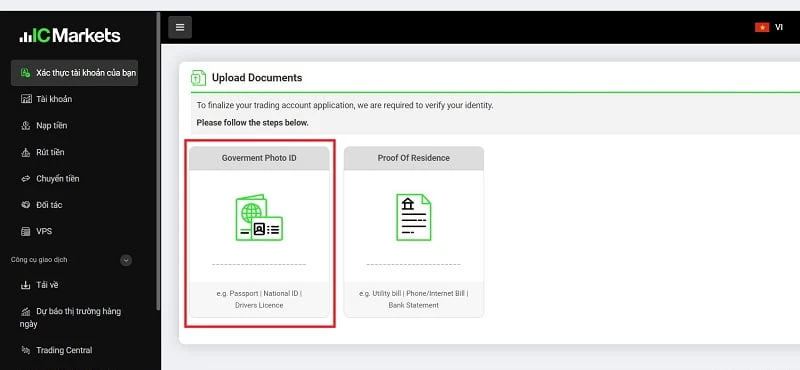
After submission, the trader can follow progress through the link for finding previously uploaded documents. Files are usually processed within 1 to 2 business days, and the broker sends an email once approval is complete.
For accounts opened through BackcomHub, once the file is approved the trader sends the account number to BackcomHub via the Telegram or email listed on the homepage, so the account can be checked against the right network. BackcomHub is an IB of the brokers listed on the site, IC Markets among them, and receives IB commission from those brokers; the rebates paid to traders come out of that commission. Rates for each account type are in the IC Markets rebates article, while traders who already hold an IC Markets account can read how the IC Markets partner programme works to learn how to request an IB change.
Frequently asked questions
Does opening an IC Markets account cost anything?
No. Registering and opening an account at IC Markets is completely free, and the trader only deposits once the account is verified and ready for trading.
Can an old national ID card be used for verification?
Yes, as long as the card is still valid and its details are clearly legible. If the card has faded or expired, a citizen ID card or passport gives the application a better chance of approval.
How long does IC Markets take to approve KYC?
Usually 1 to 2 business days, and clear applications can be approved sooner. Once it is done, the broker sends an email so the trader can log in and activate the trading account.
Key points
Opening an IC Markets account mostly calls for care: a name without diacritics that matches the documents, an address exactly as on the proof, and a platform and account type that fit the trader's style. Because conditions such as spreads and commission can change, traders should check them again on the official IC Markets website before depositing. If anything gets stuck during registration, traders can consult IC Markets help for Vietnamese traders or ask BackcomHub via the Telegram or email listed on the homepage.
Sources
- IC Markets, official website: https://www.icmarkets.com/
- DCtoptrade, "Mở tài khoản IC Markets" (screenshots of the sign-up form, setup step, security questions and document upload section): https://dctoptrade.vn/huong-dan/mo-tai-khoan-ic-markets/
- DCtoptrade (screenshots): https://dctoptrade.vn/